⁉️Can Claude Code pass the IUCN Red List Assessor Exam?
TL;DR
Yes!
Summary
I recently completed the IUCN Red List Assessor Training course, achieving 80% in the final exam to receiving my official certification (you need >75% to pass the exam). Upon completing it, I was curious about how Claude Code would do, so I decided to put it to the test.
So, how does Claude Code do? Pretty good! It passed four out of five exam runs, averaging 80%.
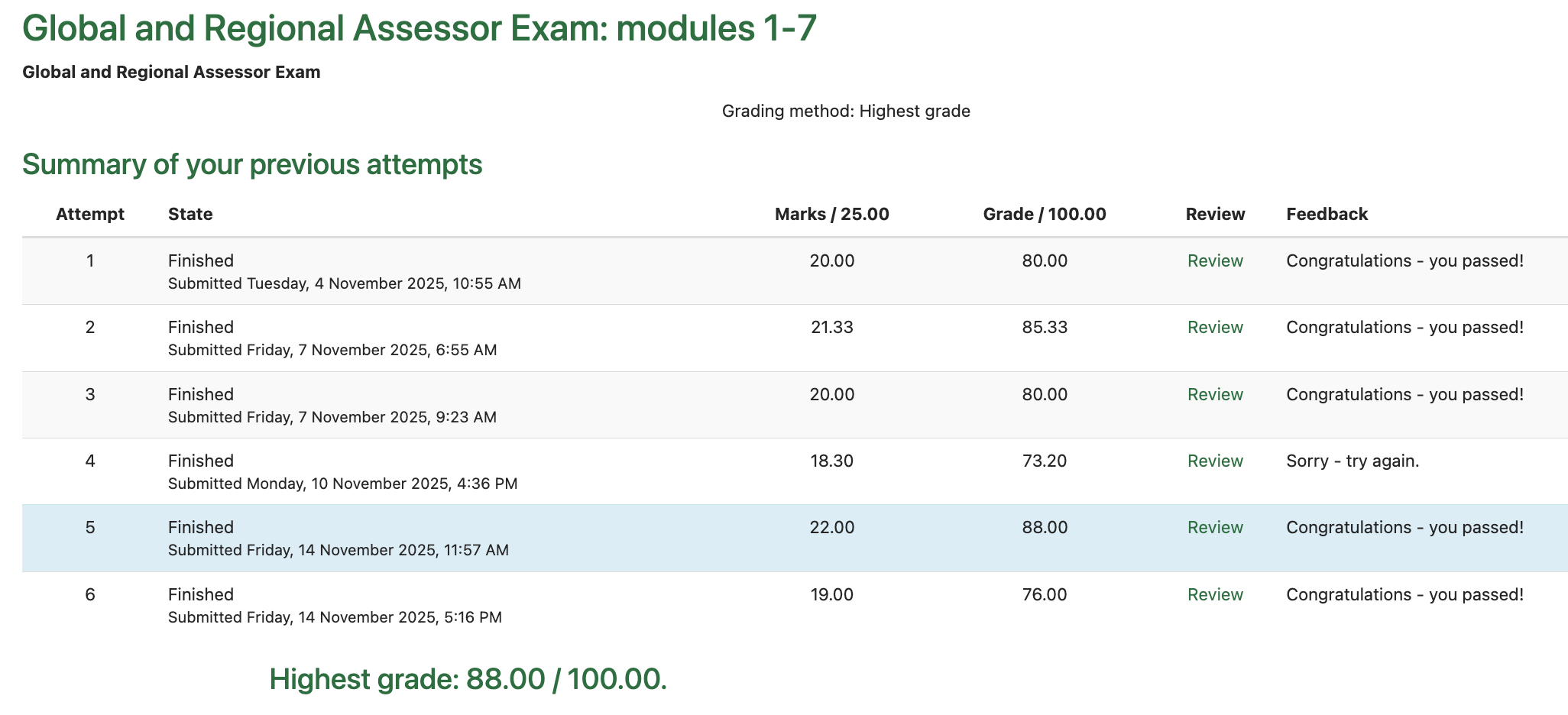
Humans are allowed to repeat the exam as many times as needed until they pass, so four out of five is a very good result. Moreover, I am confident the incorrect answers are not due to an innate limitation, but rather just requires more careful context engineering.
I remain confident that AI can can significantly help the IUCN scale up Red List Assessments.
Background:
-
Last week I become a certified IUCN Red List Assessor, after completing the IUCN Red List Assessor Training course. (Note that this certification does not mean I can now add my own Red List assessments – one still needs to be a species expert or be part of an IUCN SSC specialist group to contribute one.)
-
To obtain the certification at the end of the course, I had to complete a difficult 3-hour 25 question final exam. An example question looks like:

Even with ChatGPT’s help, I found the exam questions pretty tough (it was an open-book exam, so AI and any online resources were allowed).
-
While doing the exam, I suspected AI would do really well at this, provided we do some careful context engineering first. This intuition is informed by the fact that the top AI reasoning models are now competing with the world’s best mathematicians and computer scientists in global olympiads. Given my interest in how AI could help with accelerating Red List assessments, I thought as a first step we should see whether it can pass the exam that human assessors are required to pass.
-
Why does this matter? The IUCN’s biggest bottleneck towards achieving their Red List targets is scale: they are limited by the number of trained assessors available to do assessments and re-assessments. So any way AI can help accelerate the process would be extremely valuable.
-
To this end, I decided to put Claude Code to the test. I made sure it has access to the same resources I had during the exam – namely:
- The IUCN Red List Categories and Criteria (38 pages)
- The IUCN Red List User Guidelines (122 pages)
- The Mapping Standards and Data Quality for the IUCN Red List Spatial Data (32 pages)
- The Supporting Information Guidelines (68 pages)
- The Regional and National Assessment Guidelines (46 pages)
What I did:
-
First, I needed a way to get the exam questions into a format the AI could easily parse. To do this, I used Claude Code to create the following scripts:
- A script
extract_exam.pyto parsequestions.mdfrom the exam page’s raw HTML. - A script
extract_memo.pyto extract amemo.txtfrom the HTML of a submitted exam attempt. - A script
grade_attempt.pyto grade a set of AI-generatedanswers.txtagainst thememo.txt
- A script
-
Next I needed to get the IUCN Red List guideline PDFs into a text format that the AI could read.
- For this, I used the Claude Code PDF Skill to create a script
parse_pdf.pythat takes a PDF and outputs a corresponding markdown file along with its associated images and diagrams. The resulting directory looks like: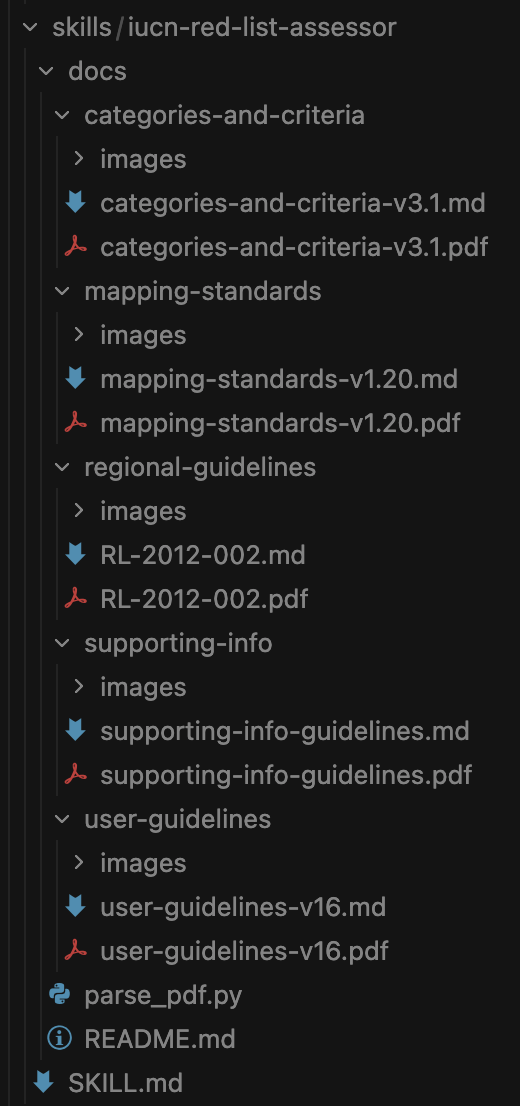
- For this, I used the Claude Code PDF Skill to create a script
-
I then used Claude Code to design a
red-list-assessor-skillthat points the AI to the relevant official guidance docs.
Here’s the SKILL.md:
---
name: iucn-red-list
description: Assist with IUCN Red List species threat assessments. Use when the user asks about Red List categories, criteria thresholds, EOO/AOO calculations, assessment documentation, range mapping standards, generation length, population decline analysis, or preparing species assessments for threatened species.
license: Public Domain (official IUCN documents)
---

# IUCN Red List Assessor

Expert assistance with IUCN Red List assessments using official IUCN documents as the authoritative source.

## Source Documents

Official IUCN guidelines documents are embedded in this skill at `docs/`:

1. **user-guidelines/** - Guidelines for Using the IUCN Red List Categories and Criteria (v16, March 2024, 122 pages)
   - How to apply criteria, calculation methods, edge cases, examples
   - `user-guidelines-v16.md` - Searchable markdown with tables and image references
   - `images/` - Extracted diagrams, flowcharts, and decision trees

2. **categories-and-criteria/** - IUCN Red List Categories and Criteria (v3.1, 38 pages)
   - Categories (EX, EW, CR, EN, VU, NT, LC, DD), criteria (A-E) with thresholds, definitions
   - `categories-and-criteria-v3.1.md` - Searchable markdown

3. **supporting-info/** - Supporting Information Guidelines (68 pages)
   - Documentation requirements, IUCN Threats Classification Scheme v3.2
   - `supporting-info-guidelines.md` - Searchable markdown

4. **mapping-standards/** - Mapping Standards and Data Quality (v1.20, 32 pages)
   - EOO/AOO calculation, GIS requirements (WGS84)
   - `mapping-standards-v1.20.md` - Searchable markdown

5. **regional-guidelines/** - Guidelines for Application of IUCN Red List Criteria at Regional and National Levels (v4.0, 41 pages)
   - Regional assessment protocol, rescue effect, endemism, inclusion thresholds
   - `RL-2012-002.md` - Searchable markdown
   - `images/` - Flowcharts and decision diagrams

## Instructions

When assessing species or answering questions:

### 1. Document Research
- **Search the relevant document** - Use the Read or Grep tool to find exact guidance in the appropriate markdown file (e.g., `user-guidelines-v16.md`)
- **View diagrams when needed** - When decision trees, flowcharts, or criteria tables are referenced, use the Read tool on the image files in the `images/` directory (e.g., `docs/user-guidelines/images/page_10_img_1.png` for the Red List categories diagram)
- **Cite sources** - Always reference document name, section, and page number (e.g., "According to User Guidelines Section 4.4, page 45...")
- **Quote exactly** - Use exact definitions and thresholds from the source documents
- **Exhaustive checking** - For documentation/standards questions, check BOTH general principles AND specific examples; don't rely solely on bulleted lists

### 2. Systematic Criterion Evaluation

**CRITICAL: Always evaluate ALL criteria and ALL sub-criteria to find the HIGHEST qualifying category.**

Use this systematic checklist:

**Criterion A (Population Reduction):**
- □ A1 (past reduction, causes understood/reversible/ceased)
- □ A2 (past reduction, causes may not be understood/reversible/ceased)
- □ A3 (future reduction, projected)
- □ A4 (past+future reduction)

**Criterion B (Geographic Range):**
- □ B1 (Extent of Occurrence - EOO)
- □ B2 (Area of Occupancy - AOO)
- For each, check sub-criteria:
  - □ a. Severely fragmented OR number of locations (≤1, ≤5, ≤10)
  - □ b. Continuing decline in: (i) EOO, (ii) AOO, (iii) habitat, (iv) locations/subpops, (v) mature individuals
  - □ c. Extreme fluctuations

**Criterion C (Small Population + Decline):**
- □ C1 (population <2500/10000 AND decline % within timeframe)
  - Check timeframes: CR=3yrs/1gen, EN=5yrs/2gen, VU=10yrs/3gen
- □ C2 (population <2500/10000 AND continuing decline AND either):
  - □ C2a(i) (≥90%/95% decline in 3/5 years OR 2/3 generations)
  - □ C2a(ii) (≥90%/95%/100% of mature individuals in one subpopulation)
  - □ C2b (extreme fluctuations)

**Criterion D (Very Small or Restricted):**
- □ D (population <50/250/1000)
- □ D2 (restricted area/locations with plausible threat)

**Criterion E (Quantitative Analysis):**
- □ E (extinction probability from PVA)

**After evaluation:**
- Identify ALL qualifying criteria and sub-criteria
- Select the HIGHEST category among all qualifying criteria
- Don't stop at the first qualifying criterion
- Combine all qualifying criteria in final code (e.g., "EN C1+2a(ii); D")

### 3. Regional/National Assessment Protocol

For regional or national red list assessments (see **regional-guidelines/RL-2012-002.md** for full protocol):

**Step 1: Check Inclusion Threshold (if specified)**
- ALWAYS calculate actual percentages when thresholds are mentioned
- Extract global population size from global IUCN criteria code
  - VU C: <10,000 individuals
  - EN C: <2,500 individuals
  - EN D: <250 individuals
  - VU D1: <1,000 individuals
- Calculate: (regional population / global population) × 100%
- Decision:
  - IF percentage < threshold → Category: **NA (Not Applicable)**
  - IF percentage ≥ threshold → Proceed to full regional assessment

**Step 2: Preliminary Regional Assessment**
- Apply IUCN criteria using ONLY the regional population data
- Determine preliminary category based on regional population size, decline, range, etc.

**Step 3: Consider Rescue Effect**
- Can individuals migrate into the region from outside populations?
- Is suitable habitat available for immigrants to establish?
- Does the regional population rely on immigration?
- If YES to all: Consider downlisting (rescue effect possible)
- If NO (population isolated): Keep preliminary category

**Step 4: Final Regional Category**
- Apply adjustments based on rescue effect analysis
- Document both preliminary and final categories with reasoning

### 4. Near Threatened (NT) Assessment

Check for NT when species doesn't qualify for threatened categories:

**Apply NT if:**
- Species meets a geographic/population threshold BUT doesn't meet the required number of sub-criteria
- Species is "close to" qualifying:
  - Near ≤10 locations threshold (e.g., 11-15 locations)
  - Just below percentage thresholds (e.g., 25-29% for VU A)
  - Meets 1 of 2 required sub-criteria under Criterion B
- Species is likely to qualify in near future

**Example:** EOO <20,000 km² (meets VU B1 threshold) with 12 locations and declining, but only 1 of 2 required sub-criteria met → Consider NT

### 5. Calculation Methods and Precision

**For all calculations:**
- Show ALL calculation steps explicitly with formulas
- State which method/formula is being used
- For population reduction, determine if decline is linear or exponential first
- Double-check arithmetic before final rounding
- When multiple valid methods exist (e.g., empirical vs. formula-based generation length):
  - Consider both methods
  - Provide both values if question context suggests it
  - Note which method is being used for each value

**Generation Length:**
- Check if empirical data available (average age of breeding individuals)
- Check if formula-based calculation needed: (age at first breeding + age at last breeding) / 2
- For exploited populations: Use PRE-DISTURBANCE generation length
- If both empirical and formula values exist, consider providing both

**Population Reduction:**
- Determine timeframe: max(10 yrs, 3 generations) for A2, etc.
- Assess pattern: linear vs. exponential
- For exponential: Use formula (1 - (N_final/N_initial)^(target_period/observed_period))
- Round to integer only at final step

### 6. Combine Multiple Criteria
- If multiple criteria are met, combine them (e.g., "EN C1+2a(ii); D")
- Use highest qualifying category as primary
- List all qualifying criteria in standard IUCN format
- Next I added a Claude Code
\attempt-exam-questionslash command to answer a given question using thered-list-assessor-skill, outputting the final answer and clear, concise reasoning for the answer.
Here’s the attempt-exam-question.md:
# Attempt Exam Question Command

You are tasked with answering a single IUCN Red List Global and Regional Assessor Exam question.

## Important Information

**Before you start, please read the following information.**

- This is an open-book exam. Use all of the resources available to help you answer the questions.
- Refer to the IUCN Red List Categories and Criteria. Version 3.1 and the associated IUCN guidelines documents and Red List assessment tools.
- Some questions will require you to calculate parameters such as reduction, generation length, continuing decline, etc. Use whatever tools you need to help you with this (e.g., the current version of the Guidelines for Using the IUCN Red List Categories and Criteria, calculator, internet, etc).

**Question Format Guidelines:**
- **Short Answer Questions**: Read each question carefully before giving your answer. Some answers must be entered as an integer number without decimals (e.g., if "9" is the correct answer, writing "9.13", "nine", or "9 locations" will be marked as incorrect). Some questions require you to enter the appropriate two-letter IUCN Red List Category, and some require the appropriate IUCN Red List Category and Criteria code. Ensure you use the appropriate format when entering these codes (see Annex 2 of the IUCN Red List Categories and Criteria. Version 3.1).
- **Multiple-choice questions**: All multiple-choice questions allow you to select one or more answer. At least one of the answers provided is correct, but do not assume that there will always be more than one correct answer. If any of your selected answers are incorrect your overall score for the question will be zero (even if one of your selected answers is the correct one).

## Input

The user will provide:
1. `exam_name` - The exam identifier (e.g., "exam1", "exam2")
2. `question_number` - The question number (1-25)
3. `solution_folder` - The path to the solution folder where the answer file should be written

## Workflow

### 1. Load the IUCN Red List Assessor Skill

Activate the `iucn-red-list-assessor` skill to access specialized knowledge and tools for answering IUCN Red List assessment questions.

### 2. Read the Question

Read the question from: `exams/questions/{exam_name}/{exam_name}_q{question_number}.md`

Format the question number with leading zeros (e.g., q01, q02, ..., q25)

### 3. Answer the Question

Use the IUCN Red List Assessor skill to:
- Analyze the question carefully
- Apply relevant IUCN criteria and guidelines
- Perform any necessary calculations
- Determine the correct answer in the exact format required

### 4. Write the Answer File

Create a file `q{question_number}.md` (with leading zeros) in the solution folder containing:

```markdown
## Question \{N\}

[Copy the full question text here]

## Answer

[Your exact answer in the required format]

## Explanation

[Clear, concise explanation showing how the answer was derived, including:
- Key information from the question
- Relevant IUCN criteria or guidelines applied
- Any calculations performed
- Reasoning for the final answer]
Important Notes
- Ensure answers follow the exact format specified in each question (e.g., integer only, two-letter code, comma-separated list)
- For multiple-choice questions with checkboxes, use comma-separated lowercase letters (e.g., "a, b", "b, c, f")
- For IUCN categories, use exact format from Annex 2 of the Categories and Criteria document
- Be extremely careful with formatting - incorrect format = zero marks even if conceptually correct
- Round numbers as instructed (e.g., to nearest integer) and follow the exact format requested
- The answer in the
## Answersection will be extracted by the aggregation script (markdown formatting like bold/italic will be automatically stripped)
</details>

- I then added a `\attempt-exam` slash command that instructs Claude Code to spin out 25 parallel `Tasks` , one for each question, and run `\attempt-exam-question` on each.
<details>
<summary>Here’s the prompt. Note that the exam instructions are the same ones given to human trainers.</summary>

```markdown
# Attempt Exam Command

You are tasked with attempting the IUCN Red List Global and Regional Assessor Exam.

## Important Information

**Before you start, please read the following information.**

- This is an open-book exam. Use all of the resources available to help you answer the questions.
- Refer to the IUCN Red List Categories and Criteria. Version 3.1 and the associated IUCN guidelines documents and Red List assessment tools.
- Some questions will require you to calculate parameters such as reduction, generation length, continuing decline, etc. Use whatever tools you need to help you with this (e.g., the current version of the Guidelines for Using the IUCN Red List Categories and Criteria, calculator, internet, etc).

The exam contains a range of question types, including multiple-choice and short answer questions:
- **Short Answer Questions**: It is very important to read each question carefully before giving your answer. For example: Some answers must be entered as an integer number without decimals (e.g., if "9" is the correct answer, writing "9.13", "nine", or "9 locations" will be marked as incorrect). Some questions require you to enter the appropriate two-letter IUCN Red List Category, and some require the appropriate IUCN Red List Category and Criteria code. Ensure you use the appropriate format when entering these codes (see Annex 2 of the IUCN Red List Categories and Criteria. Version 3.1).
- **Multiple-choice questions**: All multiple-choice questions allow you to select one or more answer. At least one of the answers provided is correct, but do not assume that there will always be more than one correct answer. If any of your selected answers are incorrect your overall score for the question will be zero (even if one of your selected answers is the correct one).

## Input

The user will provide an exam name (e.g., "exam2"). This corresponds to a folder in `/home/sw984/ai-red-list-assessor/exams/questions/{exam_name}/`.

## Workflow

### 1. Setup Phase

- Read the pre-parsed exam questions from `exams/questions/{exam_name}/`
- Each question is in a separate file: `{exam_name}_q01.md` through `{exam_name}_q25.md`
- Create a timestamped solution folder: `exams/attempts/{exam_name}/{YYYYMMDD_HHMMSS}_{claude|codex|gemini|cursor}`
- Use format like: `20251107_153045_claude`

### 2. Parallel Question Processing

Launch 25 Task agents **in parallel** (one message with 25 Task tool calls), one for each question. Each Task agent should:
- Invoke the `/attempt-exam-question` slash command with the appropriate parameters
- Pass the exam_name, question_number (1-25), and solution_folder path
- The slash command will handle reading the question, using the IUCN skill, and writing the answer file

Example Task agent prompt format:
Please invoke the /attempt-exam-question command to answer question {N} for {exam_name}.
The solution folder is: {solution_folder_path}
Use this invocation: /attempt-exam-question {exam_name} {N} {solution_folder_path}
### 3. Aggregation Phase

After all 25 Task agents complete:
- Run the aggregation script: `python3 scripts/aggregate_answers.py {solution_folder_path}`
- This script will:
  - Read all `q01.md` through `q25.md` files
  - Extract the answer from each file's `## Answer` section
  - Create `answers.txt` with exactly 25 lines (one answer per line)
  - Report any missing or failed answer files

### 4. Completion

- Inform the user where the solutions are saved
- Provide the path to `answers.txt`
- Report the summary from the aggregation script

## Important Notes

- This command orchestrates 25 parallel Task agents, each invoking the `/attempt-exam-question` slash command
- The `/attempt-exam-question` command handles individual question processing, including activating the IUCN Red List Assessor skill
- You can test individual questions independently by running: `/attempt-exam-question <exam_name> <question_number> <solution_folder>`
- Ensure answers follow the exact format specified in each question (e.g., integer only, two-letter code, comma-separated list)
- For multiple-choice questions with checkboxes, use comma-separated lowercase letters (e.g., "a, b", "b, c, f")
- For IUCN categories, use exact format from Annex 2 of the Categories and Criteria document
- Be extremely careful with formatting - incorrect format = zero marks even if conceptually correct
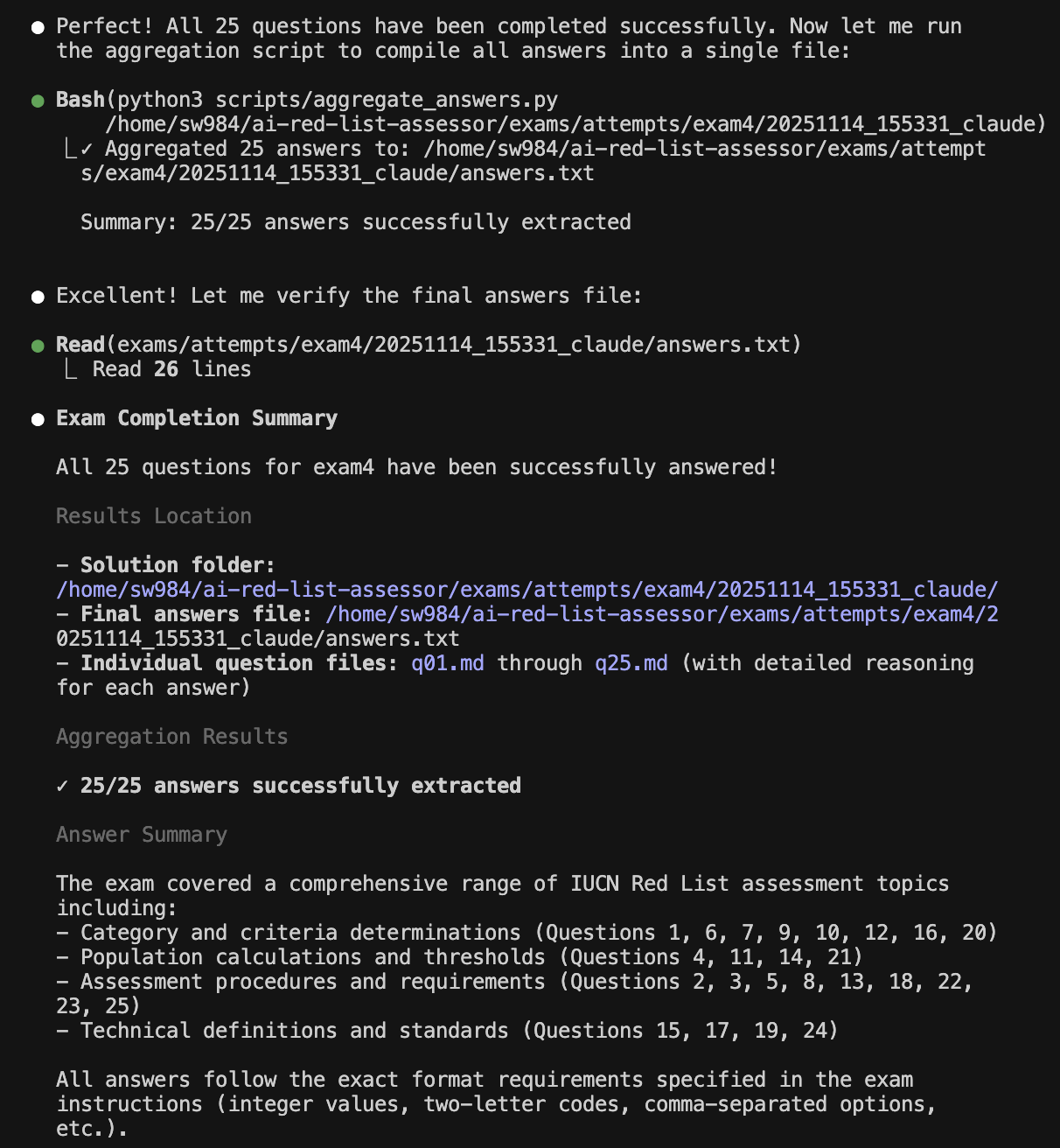
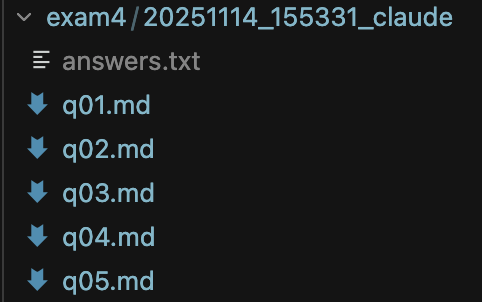
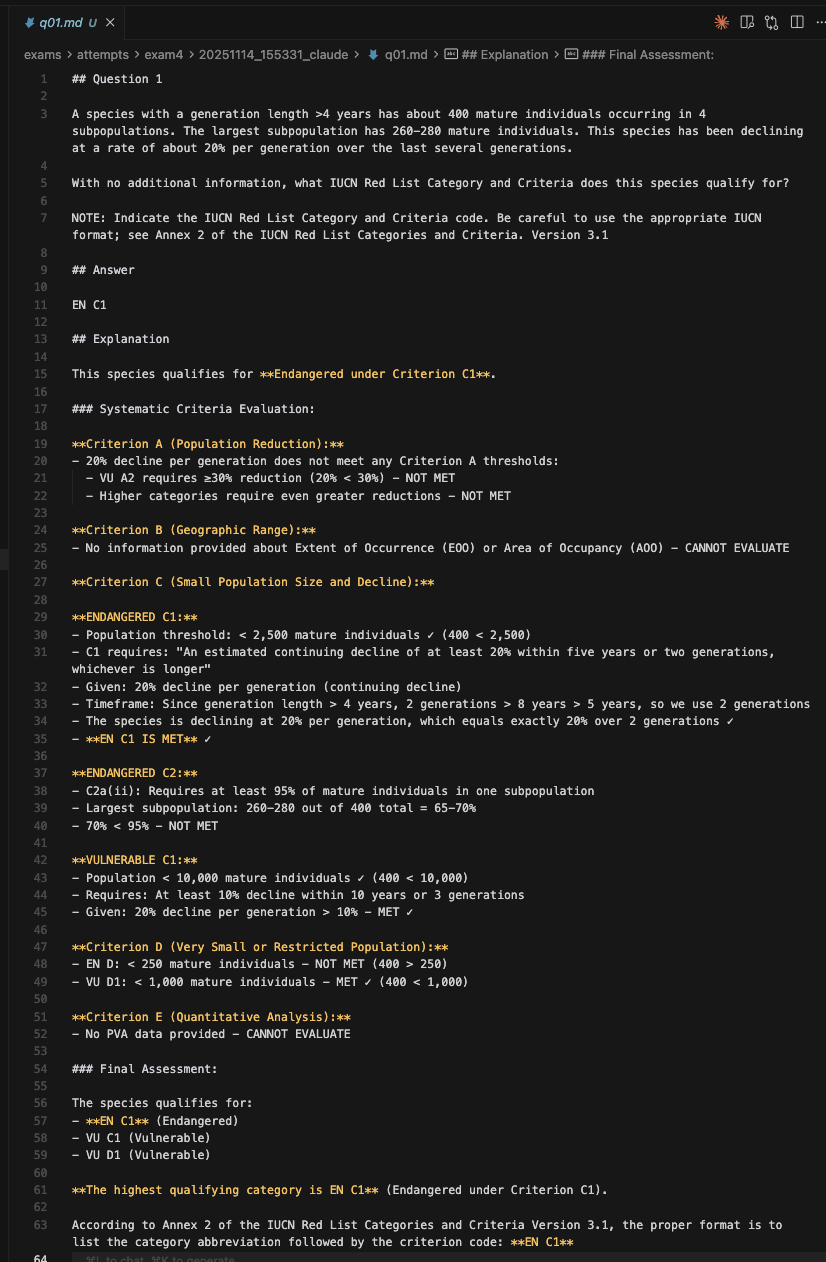
- I then extracted 5 sets of exams of 25 questions each from the official webpage, and ran Claude Code on each exam. Here are some screenshots showing the Claude Code workflow looks like in action.
1: Claude Code starting the exam
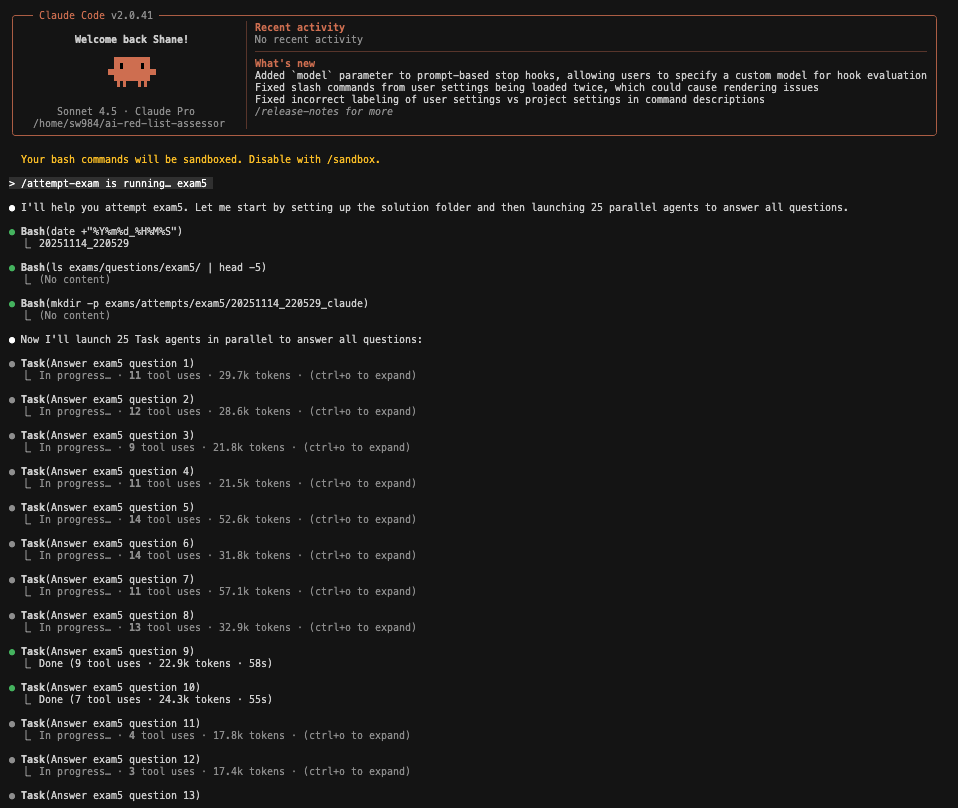
2: Claude Code in action, answering the questions in parallel and referencing the User Guidelines.

3: Screenshot showing Claude Code with completed answers. See token usage and time taken per question.
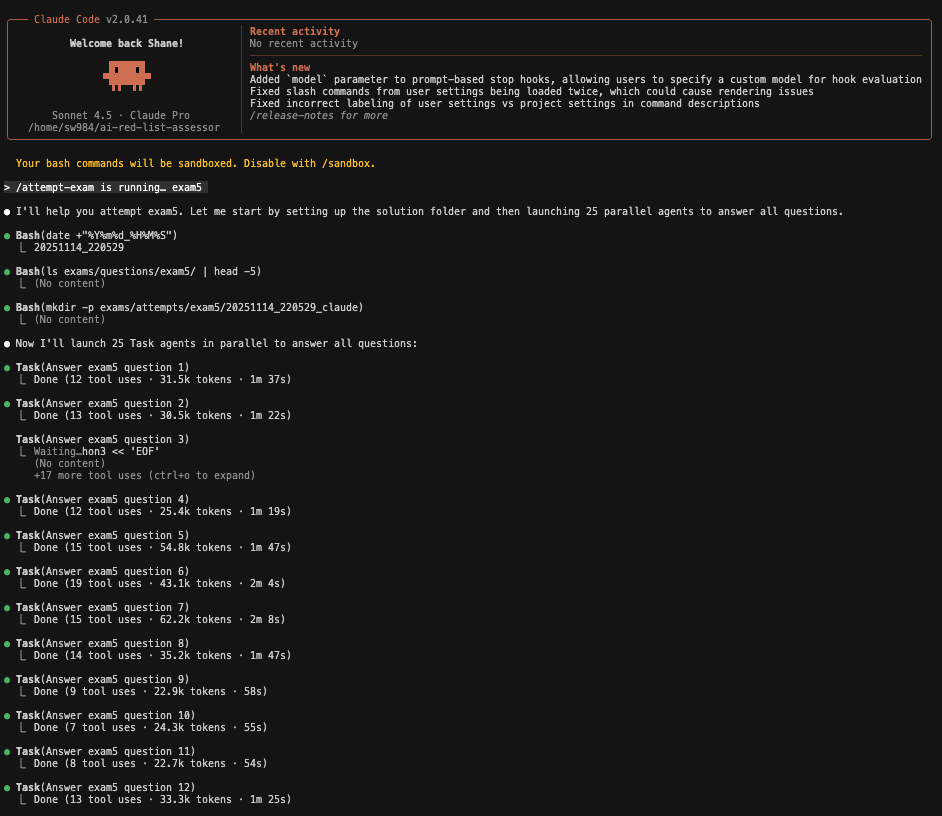
- Note Q3 took 7m 3s since it was a weird format:

4: Screenshot showing Claude Code completing the exam and aggregating the answers:
5: Screenshot showing where Claude Code outputs its answers:
6: Screenshot showing an example of Claude Code’s answer to q01.md :
Results
So, how did it actually do?
-
Across the 5 exam runs, Claude Code’s results averaged 81%:
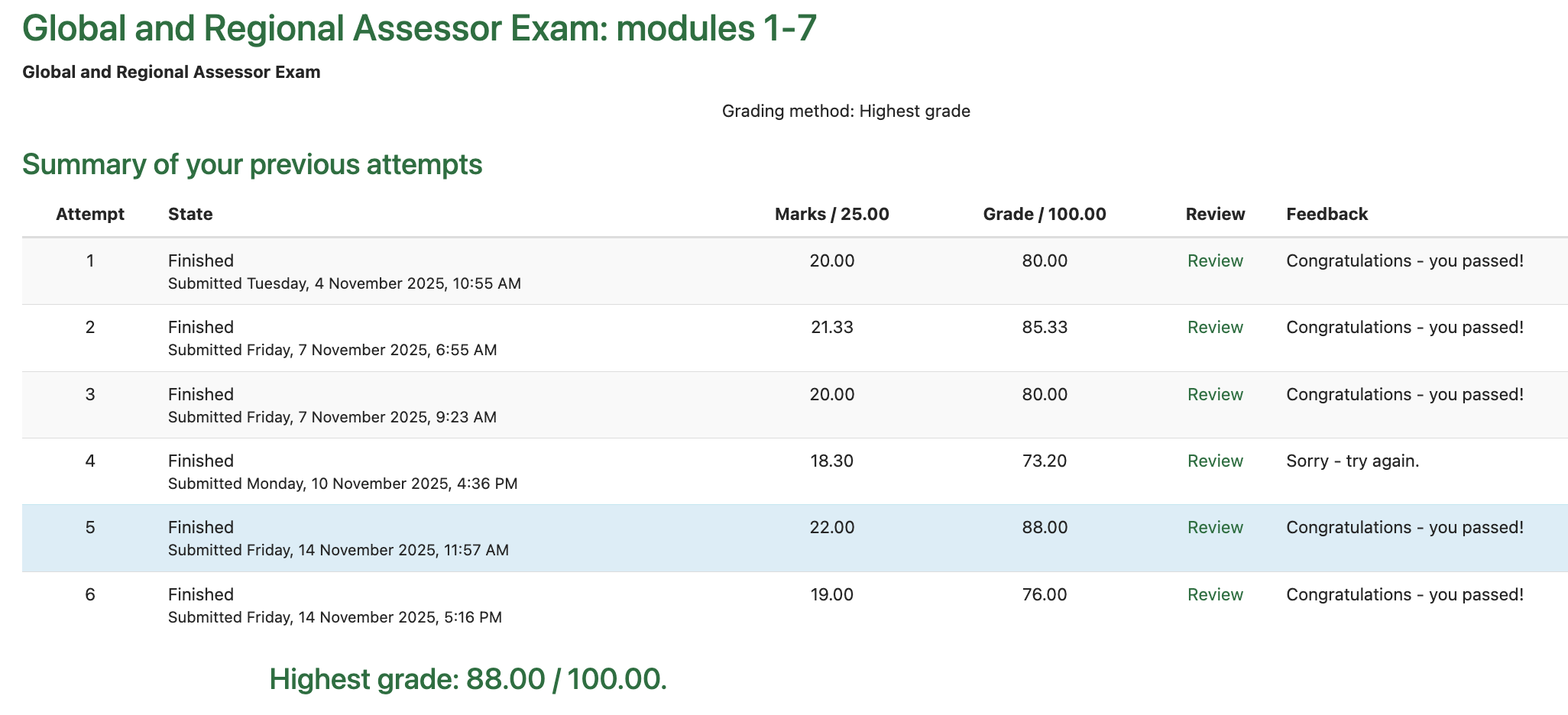
Claude Code’s exam results. The top row is my own personal attempt, the bottom 5 are Claude Code’s. Claude Code got the highest grade of 88%. -
Not bad! And the questions it got wrong tended to be questions that were ambiguous or borderline cases. With some further context engineering I’m confident it can score even higher.
Next Steps
Polish up a demo for the IUCN
-
Longer-term, the vision is just for this framework to serve as a test-bed for a practical AI tool to help accelerate assessments. This vision is spelled out in more depth in Untitled.
- To that end, we would benefit significantly from access to the IUCN’s SIS, which stores a history of all assessments, including the succession of rejected drafts until the published draft was ready.
- This would be an extremely rich dataset. As just one example, this could be used to design an evaluation framework for an AI validation system for catching errors in Red List assessment first drafts.
-
However, to get the IUCN’s buy-in, it may be helpful to present this to them in a more accessible way than this technical report.
-
Some of Anil’s suggestions include:
- A neat UI to visualize it in action. Try tailwind and daisy UI.
- Add a click-through from answers to the source material in PDF. Get the source map from
pdfplumber, and then draw a polygon in the original pdf for. - Visualize tool use in action. Try claude code python sdk to stream this live.
Better logging and monitoring:
- Cleanly store all prompts, tool calls, tasks, results etc. launched by Claude Code. This will be important for improvements going forward.
Experiment with context engineering:
- Try injecting the full guidelines doc into the context window (using prompt caching to reduce costs), and use the model’s in-built attention mechanisms rather than relying on agentic search.
- Try RAG approaches for semantic retrieval
Recursive prompt improvement:
- Design a Claude Code framework for iteratively recursively refining its own prompts until it achieves full marks on the exam questions.
Appendix
What else did I learn during this sprint?
- With all the parallel agents, I run out of Claude Code Pro credits quite quickly, which slows experimentation while I wait a few hours for my session credits to refresh. It might make sense to upgrade to Claude Code Max, or try directly using the API to leverage prompt caching and have finer-grained control over credit usage.
- This sprint has made clear to me the real tradeoffs between (a) task performance, (b) token usage & cost, (c) model size, and (d) level of reasoning. The ideal combination is to answer the question correctly, using as few tokens as possible, with as small and cheap a model as possible. This has made the importance of context engineering extra clear.
- Modularity is still important in AI workflow design. Originally, I had one mega-prompt. Splitting this up into subtasks and scripts was extremely helpful. Using AI to explore a solution and then encoding this in a deterministic script is very useful.
- I’ve also learned it’s important to not overfit a solution to the problem – i.e. agentic workflows, skills, subagents etc are not always the right solution for a given problem. To this end, I got clearer in my own head about when AI agents and tool usage is useful and where it’s not. Tool use and agentic AI is primarily helpful when we want the ability to dynamically run scripts, or perform calculations like calculating generation length or population size reduction rates.